<!-- .slide: data-background-color="#3d449d" --> # Min-Maxing .NET Minimal APIs <!-- .element: class="r-fit-text", style="color:#eaeff5"-->  <!-- Icon by pinkbirch: https://www.flaticon.com/free-icon/dice-d20_9133916 --> --- **Min-Maxing .NET Minimal APIs** - principles of min-maxing - foundations of minimal APIs - getting large - the min-max - the future - questions --- <!-- .slide: data-background-color="#dbd1b3" --> <!-- .slide: data-transition="slide" --> <div style="color:#5a3d2b;font:oblique 1em 'Vibur', sans-serif">Patrick McVeety-Mill "is"</div> <div style="color:#5a3d2b;font:normal 1.4em 'Bungee Shade', cursive;line-height:1em;padding-bottom:2rem" >Loud & Abrasive</div> <div style="display:flex; align-items: center;"> <ul style="flex:5"> <li style="color:#e73602">he/him</li> <li style="color:#e5771e">likes ⛺ 🎶 🏊♂️ 🎨 🍻 🤙</li> <li style="color:#87842c; text-decoration:line-through">Eng. Manager @ <strong style="color:#cf47ff;font-family: Arial">Accenture</strong></li> <li style="color:#2a9d8f">@pmcvtm</li> <li style="color:#264653">@loudandabrasive</li> </ul> <div style="flex:4"> <a href="https://loudandabrasive.com/card"> <img src="assets/pmcvtm-qr-code.jpg" alt="QR code which directs to https://loudandabrasive.com/card"> </a> </div> </div> --- <!-- .slide: data-background-color="#316dd9" --> ## Principles of Min-Maxing --- ➕ What is Min-Maxing? ➖ > Min-Maxing is the art of optimizing a character's abilities during creation by maximizing the most important skills and attributes, while minimizing the cost. Done by strategic decrease of stats believed to be less important, exploiting overpowered but legal combinations of the Game System... Note: From tvtropes.org Personally I associate this most with Dungeons and Dragons, but it can be done in any game with player statistics or exploitable rules. In D&D you typically become more powerful by playing the game and gaining experience points. That takes time. A min-maxer will instead find rules which act as shortcuts to those benefits. ---- 🧚♂️ Example: The Xvart 🐷  Note: As an example, this is a Xvart. In D&D, you might play as a human, ora strong orc, or an elegant elf. You can also play as a Xvart. Xvarts are very small, ugly, relatively low-intelligence creatures in comparison to most of the other playable character types. Because of this, when you elect to play as a Xvart, you get _other_ benefits, like extra levels, to compensate and keep you "even" with other players. You're 1 foot tall and smell bad, but you can also sneak around and have magic at a level much higher than your comrades. It _can_ be frowned upon in some circles. It feels like cheating. ---- ➕ What is Min-Maxing? ➖ > Seen from a purely mathematical and gamist perspective, it's an elegant process of minimum expenditure for maximum result. > > It is **getting the most by doing the least.** Note: Now, **that** is an attitude I can get behind. I am an incredibly lazy - developer. Not in that I don't like to work -- OK maybe that too -- but more importantly in that I want to minimize the amount of trivial minutia. I want to focus on the good stuff. --- ⬆️ The Goals of Min-Maxing ⬆️ - reduce overhead of building application - focus on features / "important" concerns - still deliver a comprehensive application --- 📉 The Principles of Min-Maxing 📈 - favor larger **up-front** over **ongoing minutia** - leverage **conventions** leaving room for **exceptions** - exploit without breaking - **know when to walk away** Note: In all of these, we want to be pragmatic and know our limits --- <!-- .slide: data-background-color="#316dd9" --> ## Minimal API Foundations Note: If you're familiar with web development, these will look familiar! If you know .NET, even better. --- 🤏 Minimal APIs 6️⃣ - introduced in ASP.NET Core 6.0 - REST-style web requests w/o MVC scaffolding - brings (formal) .NET web frameworks up to present day Note: - These came out in 2021? - Allow folks to leverage all the proven, developed middleware without extra cruff - Other languages and runtimes were here already - JS/Node/Express; many in python; Ruby Sinatra - .NET had `Nancy` and more recently `Carter` but nothing "official" --- 🧐 Why Listen to Me? 🤔 - 10+ years in .NET web dev (MVC) across industries - "recently" large Razor Pages app - last year- a fit for minimal APIs sweet spot --- 🐠 Our Sample API 🌿 - manage Aquariums (CRUD) - manage Fish (CRUD) - manage Decor (CRUD) - feed the Fish (Action) - clean the Aquarium (Status, Action) Note: As we continue talking about Minimal APIs we're going to use a Fish Aquarium management application as our example. This is an API with more than type of consumer: someone might have a CLI for it, or a web app with a UI. We don't know. But it has these basic features: (CRUD is Create Read Update Delete) --- <!-- .slide: data-background-image="assets/nolan-krattinger-ADcXaqQ9vOM-unsplash.jpg", data-background-size="cover" --> <!-- Image source: Nolan Krattinger on https://unsplash.com/photos/ADcXaqQ9vOM --> Note: An image of a beautiful aquarium --- 🐡 Our Requirements 🦈 - well- and self- documented - secure and validated endpoints - open for expansion and extension Note: Since we don't know our consumers, we want best-in-class clear documentation. We of course need secure endpoints and robust request validation We need to get these features added in a way we can easily add more, or extend the inner workings to support other components ---- 😤 A Nice Documentation Site 🥲  Note: We want a sexy documentation site like this: - (consider going to live site) - each endpoint has a description, the schemas are consistent and linkable - response codes are set up --- <!-- .slide: data-background-color="#f1d1a8" --> 👩💻 Sidebar: Sample Code 👨💻 - available at [github.com/pmcvtm/presentations](https://github.com/pmcvtm/presentations) - will be a linked in session resources in the future - representative, but **incomplete** - showing code for concepts _(you can copy/paste later)_ Note: - Solution is built out, with commit history going through what we've doing today. - Does not include **everything** we're talking about, but should give you an idea - Going to be moving quickly over code samples today; the goal is to understand the concepts, not get this all down directly --- 🏫 Tutorial Speedrun 🏃♂️ ```csharp [|1,5,21|7|8,10-11|2,13-14|3,16,18-19|] var builder = WebApplication.CreateBuilder(args); builder.Services.AddScoped<IFishService>(); builder.Services.AddDefaultIdentity<IdentityUser>(); var app = builder.Build(); app.MapGet("/fish", () => "Hello Fish!"); app.MapGet("/fish/{name}", (string name) => $"Hello {name}!"); app.MapPost("/fish", ([FromBody] Fish fish) => $"Hello {fish.Name}!"); app.MapPut("/fish", ([FromBody] Fish fish, [FromService] IFishService service) => service.SayHello(fish)); app.MapPost("/fish/feed", () => "Om nom nom").RequireAuthorization() app.UseAuthentication(); app.UseAuthorization(); app.Run(); ``` <!-- .element: class="stretch" --> Note: Let's run through the tutorial for anyone who hasn't seen it or needs a referesher. - This is `Main()` in `Program.cs`. No wrapping class, and no `Startup`. All in one - Here are our core parts: building up the web app, and running it - We can register an endpoint - a Route and Verb an Http Request comes through to, and our response to it - Endpoints can be parameterized either by URL query or request body - Services can be registered to our IoC container and injected into our response delegates - Middleware works just like it used to, we register it, configure our endpoints with them, and then tell the app to use them --- <!-- .slide: data-background-image="assets/ahmed-zayan-URaZrRvKQqM-unsplash.jpg", data-background-size="cover" --> <!-- Image source: Ahmed Zayan on https://unsplash.com/photos/URaZrRvKQqM --> Note: An image of a fishbowl with a goldfish cramped in it. So here's what we can get from that tutorial as far as our fish! --- 👍 Nice Stuff 🆒 - straightforward, fluent syntax for **visible** behavior - _FAST!_ to write, but also to run - natural fit for **Vertical Slice Architecture** Notes: - straightforward to implement, with less "magic" than MVC - .NET 6 is super performant, with minimal APIs gaining on MVC as well - an architectural "pit of success" for organizing your code in a manageable way ---- <!-- .slide: data-background-color="#f1d1a8" --> 🍰 Sidebar: Vertical Slices 🍕 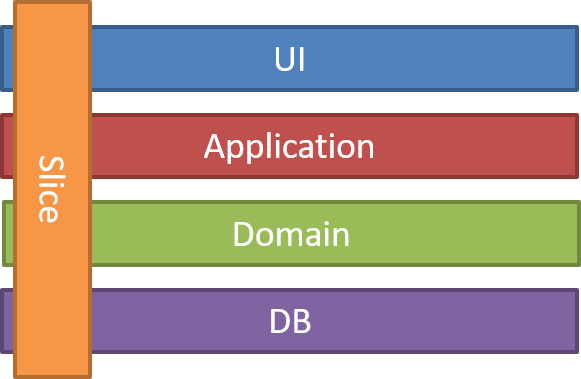 Source: [jimmybogard.com](https://jimmybogard.com/vertical-slice-architecture) <!-- .element: style="font-size: 0.5em" --> Note: Made popular by Jimmy Bogard - If you think about our concerns when implementing a feature in an application or system, we typically have these layers. And a historically common pattern would be to organize code and build wide-reaching components around these layers. Vertical slices are instead organized around distinct requests, where you encapsulate all of the concerns required for a given feature or activity _across_ layers, instead of within them. If you have used MVC and organized your controllers into `Feature Folders` or used the `Mediatr` library you may be familiar with this. Additionally if you've hopped over to Razor Pages, those are similarly set up to "fall" into this organizational pattern. --- <!-- .slide: data-background-color="#316dd9" --> ## Getting Large Note: Let's start addressing the actual concerns we have in our api; the features and infrastructure we need to get by --- <!-- .slide: data-background-color="#3d449d" --> ### Important Integrations --- 🔒 Security / Auth 🔑 - uses ASP.NET middleware **just great** - auth applied per-endpoint by policy <!-- .element: style="padding-bottom: 1em" --> 1. set up auth middleware and policies 2. add authorization scopes to each endpoint ---- 🔒 Auth Middleware Setup 🔑 ```csharp [|1-3|5|6-12] services.AddAuthentication() //Whatever Auth You Want ; services.AddAuthorization(opt => { foreach(var scope in ApiScope.GetAll()) { var scopePolicy = new AuthorizationPolicyBuilder() .RequireClaim(SecurityConstants.Claims.Scope, scope.Name) .Build(); opt.AddPolicy(scopePolicy); } }); ``` Note: Here we set up authentication and authorization by middleware in our services buildup 1. any authentication middleware will do - OIDC with jwts, identity sign-in, etc 2. for authorization, we'll loop through all our defined scopes and add each as a policy this makes it easy to reference later ---- 🔐 Auth Endpoint Configuration 🗝 ```csharp [|1,5|3,7|9-10] app.MapGet("/aquariums", (IAquariumService service) => service.GetAquariums()) .RequireAuthorization(ApiScopes.AquariumManagement); app.MapPost("/aquariums", (Aquarium request, IAquariumService service) => service.AddAquarium(request)) .RequireAuthorization(ApiScopes.AquariumManagement); app.MapGet("/fish", (IFishService) => service.GetFishes()) .RequireAuthorization(SecurityConstants.Scopes.FishManagement); ``` <!-- .element: style="height:80%" --> Notes: 1. We have 2 aquarium endpoints 2. Each will require the `AquariumManagement Scope` 3. Our "get fish" endpoint requires the `FishManagement` scope --- 📜 Documentation ✍ - leverages OpenAPI metadata - or integrates with Swagger / Swashbuckle / NSwag - tries its hardest to infer (but better to be explicit) - configured per-endpoint: <!-- .element: style="padding-bottom: 1em" --> 1. add descriptive metadata for request/responses 2. add descriptive metadata for Swagger docs 3. _(set up Swagger at startup)_ Note: This will get us all our nice possible response codes and descriptions listed out in our docs, and any schema-linking for matching types... a big help for our consumers writing their apps ---- 📜 Adding Built-In HttpMetadata ✍ ```csharp [1-2|3|4|5-7] app.MapGet("/aquariums", (IAquariumService service) => service.GetAquariums()) .RequireAuthorization(ApiScopes.AquariumManagement) .WithTags("aquariums") .Produces(200, responseType: typeof(Aquarium[])) .Produces(401) .Produces(500); ``` Notes: Here's our get-all aquariums endpoint, with the security 1. First a tag, to group this with other "aquarium" requests 2. On success produces a 200 with an array of Aquariums 3. Also can produce 401, or 500 (you can imagine other endpoints will have other responses too) ---- 📜 Adding Swagger Annotations ✍ ```csharp [|4-5] app.MapGet("/aquariums", (IAquariumService service) => service.GetAquariums()) .RequireAuthorization(ApiScopes.AquariumManagement) .WithTags("aquariums") .WithMetadata(new SwaggerOperationAttribute("Retrieve all Aquariums")); .WithMetadata(new SwaggerResponseAttribute(403, "Forbidden. User is not authorized for this endpoint")); .Produces(200, responseType: typeof(Aquarium[])) .Produces(401) .Produces(500); ``` Note: Add the operation description to our Swagger doc as well as a 403 with some more info on what that means As an aside... ---- 👖 MetaData "Belt and Suspenders" 🧷 ```csharp [] public static RouteHandlerBuilder WithResponse<T>( this RouteHandlerBuilder builder, int code, string? description = null) { builder.Produces(code, responseType: typeof(T)); builder.WithMetadata(new SwaggerResponseAttribute(code, description, typeof(T))); return builder; } ``` ```csharp [] app.MapGet("/aquariums", (IAquariumService service) => service.GetAquariums()) .WithResponse<Aquarium[]>(200, "Return all fish aquariums") ``` Note: I am nervous about covering all the bases, so I use this helper method which adds a response code both using the Http Metadata and using Swagger attributes. This is the type'd version for responses with a body - we also have one without. --- 🔢 Versioning 🆙 - integrates with [`Asp.Versioning.Http`](https://www.nuget.org/packages/Asp.Versioning.Http) - compatible with OpenAPI definitions - **only supports version by URL query string** <!-- .element: style="padding-bottom: 1em" --> 1. Define our versions at startup 2. Register each endpoint for its versions ---- 🔢 With .NET ASP.NET Versions 🆙 ```csharp [] app.DefineApi() .HasApiVersion( 1.0 ) .HasApiVersion( 2.0 ) .ReportApiVersions(); ``` ```csharp [|9-10] app.MapGet("/aquariums", (IAquariumService service) => service.GetAquariums()) .RequireAuthorization(ApiScopes.AquariumManagement) .WithTags("aquariums") .WithMetadata(new SwaggerOperationAttribute("Retrieve all Aquariums")); .WithResponse<Aquarium[]>(200, "All fish aquariums") .WithResponse(401, "Unauthorized. The request requires authentication") .WithResponse(403, "Forbidden. User is not authorized for this endpoint") .WithResponse(500, "Internal server error.") .HasDeprecatedApiVersion( 0.9 ) .HasApiVersion( 1.0 ); ``` Note: You can also use OpenAPI Versions 1. Define versions at app startup 2. Add those versions to the endpoint I personally like storing these in some static context to make it easier / guarantee consistency. Also as a side note - part of the motivator for our big min-maxing solution was due to versioning; at the time (and maybe now) only URL query versioning was supported, and we wanted our versions in the route directly. I won't be talking about that explicitly, but you can probably see how it fits in. --- 🤝 All Together Now 👐 ```csharp [|1|2|3-4|5-8|9-10|] app.MapGet("/aquariums", (IAquariumService service) => service.GetAquariums()) .RequireAuthorization(ApiScopes.AquariumManagement) .WithTags("aquariums") .WithMetadata(new SwaggerOperationAttribute("Retrieve all Aquariums")); .WithResponse<Aquarium[]>(200, "All fish aquariums") .WithResponse(401, "Unauthorized. The request requires authentication") .WithResponse(403, "Forbidden. User is not authorized for this endpoint") .WithResponse(500, "Internal server error.") .HasDeprecatedApiVersion( 0.9 ) .HasApiVersion( 1.0 ); ``` Note: Here's our whole endpoint for getting aquariums: 1. Route and verb registration 2. Authorization 3. Descriptive metadata for Swagger 4. Response metadata for Swagger 5. Versions ---- 🔂 (All Together Now) 👐 ```csharp [|1|4-5|6|] app.MapPost("/aquariums", (Aquarium request, IAquariumService service) => service.CreateAquarium(request)) .RequireAuthorization(ApiScopes.AquariumManagement) .WithTags("aquariums") .WithMetadata(new SwaggerOperationAttribute("Create a new Aquarium")); .WithResponse<Aquarium>(201, "Aquarium created") .WithResponse(400, "Bad Request. The request was invalid and cannot be completed. See the response body for details") .WithResponse(401, "Unauthorized. The request requires authentication") .WithResponse(403, "Forbidden. User is not authorized for this endpoint") .WithResponse(500, "Internal server error.") .HasDeprecatedApiVersion( 0.9 ) .HasApiVersion( 1.0 ); ``` Note: Again! 1. For our POST / create method 2. Mostly the same, slightly different descriptions 3. Note we also have a 400 in the mix here ---- 🔁 Again 👐 ```csharp [|1|9|] app.MapPut("/aquariums/{id}",(int id, Aquarium request, IAquariumService service) => service.UpdateAquarium(id, request)) .RequireAuthorization(ApiScopes.AquariumManagement) .WithTags("aquariums") .WithMetadata(new SwaggerOperationAttribute("Updates an existing Aquarium")); .WithResponse<Aquarium>(200, "Aquarium updated") .WithResponse(400, "Bad Request. The request was invalid and cannot be completed. See the response body for details") .WithResponse(401, "Unauthorized. The request requires authentication") .WithResponse(403, "Forbidden. User is not authorized for this endpoint") .WithResponse(404, "Not found. The resource identifier is invalid") .WithResponse(500, "Internal server error.") .HasDeprecatedApiVersion( 0.9 ) .HasApiVersion( 1.0 ); ``` Note: Again! 1. For PUT / update ... more or less the same 2. We have a 404 not found response here now ---- 🔁 And Again 😰 ```csharp [|1|8|] app.MapGet("/aquariums/{id}",(int id, IAquariumService service) => service.GetAquarium(id)) .RequireAuthorization(ApiScopes.AquariumManagement) .WithTags("aquariums") .WithMetadata(new SwaggerOperationAttribute("Fetches an existing Aquarium")); .WithResponse<Aquarium>(200, "Aquarium retrieved") .WithResponse(401, "Unauthorized. The request requires authentication") .WithResponse(403, "Forbidden. User is not authorized for this endpoint") .WithResponse(404, "Not found. The resource identifier is invalid") .WithResponse(500, "Internal server error.") .HasDeprecatedApiVersion( 0.9 ) .HasApiVersion( 1.0 ); ``` Note: Again! 1. For GET a single aquarium 2. We have a 404 but not the 400... slightly different descriptions... ---- 🔁 And Again 😩 ```csharp [|1|2-3|4-5|6-8|9|] app.MapGet("/fish", (IFishService service) => service.GetFishes()) .RequireAuthorization(ApiScopes.FishManagement) .WithTags("fish") .WithMetadata(new SwaggerOperationAttribute("Fetches all fish")); .WithResponse<FishModel[]>(200, "All fish tracked by the system") .WithResponse(401, "Unauthorized. The request requires authentication") .WithResponse(403, "Forbidden. User is not authorized for this endpoint") .WithResponse(500, "Internal server error. An unhandled error occurred on the server. See the response body for details.") .HasApiVersion( 1.0 ); ``` Note: And now we start on our **Fish** endpoints 1. Get at the fish/ route will use a different service I guess 2. Now we need the fish auth scope and doc grouping 3. Different return model and descriptions 4. Same universal responses 5. Fish are v1 only so that's a little different --- <!-- .slide: data-background-image="assets/thomas-park-21hpHNuO5II-unsplash.jpg", data-background-size="cover" --> <!-- Image source: Thomas Park on https://unsplash.com/photos/21hpHNuO5II --> Note: An image of a somewhat dirty fish tank full of goldfish And we're going to keep doing this for all of our endpoints. So we've grown from our little fishbowl - but it's messy, and very repetitious. --- <!-- .slide: data-background-color="#e77f33" --> ### Feeling the Pain --- 💀 The Pains ⛑️ - repeating code to generate same or similar results - entirely around `RouteHandlerBuilder` extensions - patterns emerge by: - resource - HTTP method ---- 💧 Patterns: By Resource 🐠 - the **authorization scopes** we require - the **groups** for our endpoints - the **nouns** in our documentation ---- 🕸 Patterns: By HTTP Method 🆗 - the **kinds of responses** we might return - the **verbs** in our documentation Note: Whether a 404 makes sense, and which CRUD action we're taking --- <!-- .slide: data-background-color="#316dd9" --> ## Min-Maxing --- <!-- .slide: data-background-color="#3d449d" --> ### Softball Solutions --- 🫴 Refactoring 🤌 ```csharp [] public static RouteHanderBuilder WithDefaultResponses (this RouteHandlerBuilder builder) { return builder .WithResponse(401, "Unauthorized. The request requires authentication") .WithResponse(403, "Forbidden. User is not authorized for this endpoint") .WithResponse(404, "Not found. The resource identifier is invalid") .WithResponse(500, "Internal server error."); } ``` Note: I can imagine some of you were getting impatient through that last section. "PATRICK WHY ARE YOU DOING THAT!?" So this is our lowest hanging fruit - we can collect our universal or parameterize-able customizations and pull out new extension methods. But this is only about half of them! Still lots we can do. --- 📦 .NET 7 Route Groups 🖇 - allows grouping by prefix - designed with auth and metadata in mind - _still a bit repetitious_ ---- 📦 Route Groups in Action 🖇 ```csharp [] app.MapGroup("/public/fish") .MapFishApi() .WithDefaultResponseCodes() .AllowAnonymous(); app.MapGroup("/private/fish") .MapFishApi() .WithDefaultResponseCodes() .WithAuthResponseCodes() .RequireAuthorization(); public static RouteGroupBuilder MapFishApi(this RouteGroupBuilder group) { group.MapGet("/", GetAllFish).WithDescription("Get all the fish"); group.MapGet("/{id}", GetSingleFish).WithDescription("Get a specific fish"); group.MapPost("/", AddFish).WithDescription("Create a new fish"); group.MapPut("/{id}", EditFish).WithDescription("Edit a fish"); group.MapDelete("/{id}", DeleteFish).WithDescription("Remove a fish"); return group; } ``` <!-- .element: class="stretch" --> Note: Route groups let you apply customizations to a bunch of endpoints per prefix. I don't use these since we were sticking with LTS, but also for other reasons we'll get into. --- 🔻 .NET 7 Endpoint Filters 🌟 - like filters in MVC - applied individually or to groups - use case: validation ---- 🔻 Endpoint Filters in Action 🌟 ```csharp app.MapPost("/fish/", ColorName) .AddEndpointFilter(async (invocationContext, next) => { var fish = invocationContext.GetArgument<AddFishModel>(0); if (fish.Status == "Dead") return Results.Problem("Dead fish not allowed!"); return await next(invocationContext); }); // or app.MapPost("/fish/", AddFish) .AddEndpointFilter<ValidateFish>(); ``` Note: You can imagine getting smarter about this. And having a filter which searches IoC container for the relevant validator. [Ben Foster](https://benfoster.io/blog/minimal-api-validation-endpoint-filters/) has a good guide for this. --- 🌟 Filters and Groups Together 🤝 ```csharp [] var all = app .MapGroup("/") .WithDefaultResponseCodes() .AddEndpointFilter<ValidationEndpointFilter>(); var aquariums = all.MapGroup("aquariums") .RequireAuthorization("AquariumManagement") .MapGet("/", GetAquariums) //... ``` Note: You can see how this starts to get a little smarter, a bit less code, but also a little bit more magic... You still are doing **customization** rather than conventions, it's just better organized and less code. We'll come back to this. --- ↔️ Other Cross-Cut Tooling ✂️ - leverage options from your tools - (when it makes sense to) - example: Swagger filter for endpoint groups (`Tag`) Note: Our libraries and tooling may have options which make these registrations simpler. ---- 👪 Swagger Tag Grouping ↔️ ```csharp [|5-6|11-17|] public class GroupEndpointsByUrlFilter : IOperationFilter { public void Apply(OpenApiOperation operation, OperationFilterContext context) { var urlParts = context.ApiDescription.RelativePath? .Split("/") ?? Array.Empty<string>(); if (urlParts.Length == 0) return; var resourceName = urlParts[0]; if(!string.IsNullOrWhiteSpace(resourceName)) operation.Tags = new List<OpenApiTag> { new() { Name = CultureInfo.CurrentCulture .TextInfo.ToTitleCase(resourceName.Trim('/')) } }; } } ``` <!-- .element: class="stretch" --> Note: - This is a naive implementation without versions - pull resource name from url and replace tags with it - never worry about tags again! --- 🍕 The Feature Pattern 🍰 - move our endpoints out of `Program.cs` - introduce `IFeature` to hold endpoint definitions - reflect, loop and register each endpoint set - gives room for functionality + encapsulates handling ---- 🚩 Features at Startup 🍕 ```csharp [] public interface IFeature { public void MapEndpoints(IEndpointRouteBuilder endpoints) } ``` ```csharp [|3-6|8-9|] application.UseEndpoints(endpoints => { var features = Assembly.GetExecutingAssembly().GetTypes() .Where(typ => typeof(IFeature).IsAssignableFrom(typ) && typ.IsClass) .Select(impl => Activator.CreateInstance(impl) as IFeature) .Where(impl => impl != null); foreach (var feature in features) feature!.MapEndpoints(endpoints); }); ``` ---- 🔚 Endpoints as Features 🍰 ```csharp [|1-3|4-9|11-19|] public class AddAquariums : IFeature { public void MapEndpoints(IEndpointRouteBuilder endpoints) => endpoints.MapPost("/aquariums", Handle); //(Other methods omitted) public async Task<IResult> Handle(Validator validator, FishContext db, Request request) { //Feature! } public record Request { //Properties! } public class Validator : AbstractValidator<Request> { //Rules! } } ``` <!-- .element: class="stretch" --> Note: Here is an endpoint in that feature pattern 1. Interface implementation 2. Lots of room for our handler 3. Room to encapsulate request, validator, helpers, etc --- 📈 We're Better Off 👍 - more organized - DRY'd up obvious parts - still repeating patterns by: - resource - HTTP method Note: But we're still customizing most of our endpoints individually, and when we're writing new features they're still mostly the same. --- ↔ `RouteHandlerBuilder` 🚧 - designed for extension methods - `sealed` and has few props - any "state" is in untrustworthy `List<Object> MetaData` - we _might could_ parse out what we need Notes: When we talked about the patterns that emerge, they were around information we sort of "have" in our RouteBuilder, or at least used in proximity of. However we can't get to it easily. --- <!-- .slide: data-background-color="#3d449d" --> ### We can build it 👷 --- 🤔 `OpinionatedEndpointBuilder` 🔚 - tracks HTTP verb + resource name - sets conventional defaults - provides optional overrides --- 🌯 Opinionated Builder 🫔 - new builder class (with `Build()`) - wrap `IEndpointRouteBuilder` methods - track state we want to make conventional decisions around - force Feature endpoints to use new builder ---- 🫔 Builder: Constructor and Mapping 🏗️ ```csharp [|1|8,9|3-5,11-17|6,15] public class OpinionatedEndpointBuilder { private HttpVerb? _verb; private string? _route; private Delegate? _handler; private string _resourceName; public OpinionatedEndpointBuilder(IEndpointRouteBuilder endpoints) => _endpoints = endpoints; private OpinionatedEndpointBuilder MapEndpoint (HttpVerb verb, string route, Delegate handler) { _verb = verb; _handler = handler; _route = route.Trim('/'); _resourceName = _route.Split('/').First(); return this; } //... } ``` <!-- .element: class="stretch" --> Notes: 1. Constructor takes `IEndpointRouteBuilder` 2. Tracks `verb`, `route`, `handler` 3. **private** method to set those values 4. also store the `resource name` from the URL ---- 🫔 Builder: Endpoint Registration 🔀 ```csharp [5-16] public class OpinionatedEndpointBuilder { // ... public OpinionatedEndpointBuilder MapGet(string route, Delegate handler) => MapEndpoint(HttpVerb.GET, route, handler); public OpinionatedEndpointBuilder MapPost(string route, Delegate handler) => MapEndpoint(HttpVerb.POST, route, handler); public OpinionatedEndpointBuilder MapPut(string route, Delegate handler) => MapEndpoint(HttpVerb.PUT, route, handler); public OpinionatedEndpointBuilder MapDelete(string route, Delegate handler) => MapEndpoint(HttpVerb.DELETE, route, handler); //... } ``` <!-- .element: class="stretch" --> Note: A new method for each of the `IEndpointRouteBuilder` mappers ---- 🫔 Builder: `Build()` 🚧 ```csharp [5-19|10-17|10] public class OpinionatedEndpointBuilder { // ... public void Build() { if (_verb == null || _route == null || _handler == null) throw new Exception("Invalid endpoint registration"); var builder = _verb switch { HttpVerb.GET => _endpoints.MapGet(_route, _handler), HttpVerb.POST => _endpoints.MapPost(_route, _handler), HttpVerb.PUT => _endpoints.MapPut(_route, _handler), HttpVerb.DELETE => _endpoints.MapDelete(_route, _handler), _ => throw new NotImplementedException ($"Unconfigured HTTP verb for mapping: {_verb}") }; } //... } ``` <!-- .element: class="stretch" --> Notes: And like any builder, we're going to need a `build()` method! 1. Here we'll actually map the endpoints 2. Pattern match based on verb and pass-through 3. Save `RouteHandlerBuilder` for later use ---- 💀 Refactoring `IFeature` ➡ `Feature` 🍕 ```csharp [|3|4-5|] public abstract class Feature { //formerly void MapEndpoints(IEndpointRouteBuilder endpoints) public abstract void ConfigureEndpoint (OpinionatedEndpointBuilder builder); } ``` ```csharp [|3|5-7|] application.UseEndpoints(endpoints => { foreach (var feature in GetFeatures().ToList()) { var builder = new OpinionatedEndpointBuilder(endpoints); feature.ConfigureEndpoint(builder); builder.Build(); } }); ``` --- 🔑 Refactored Security Scopes 🔏 - pass-thru extension methods - authorized _or_ anonymous - introduce **default** lookup ---- 🔑 Security Builder Methods 🏗️ ```csharp [|1-7|9-15|] private ApiScope[] _scopes; public OpinionatedEndpointBuilder RequireScopes(params ApiScope[] scopes) { _scopes = scopes; return this; } private bool allowAnonymous = false; public OpinionatedEndpointBuilder AllowAnonymous() { _allowAnonymous = true; return this; } ``` Note: Here are our pass-thru methods 1. We can pass in our scopes 2. Or we can specify that it's anonymous ---- 🔑 Security `Build()` 👷 ```csharp [|6-7|8-9|10-14|] public void Build() { var builder = _verb switch //... // ... if(_allowAnonymous) builder.AllowAnonymous(); else if(_scopes.Length > 0) builder.RequireAuthorization(_scopes); else { if(ApiScopes.TryGetForResource(_resourceName, out var scopes)) builder.RequireAuthorization(scopes); } } ``` Note: In our build method: 1. AllowAnonymous takes precedence 2. Or we set explicit scopes 3. Finally we add our **default** handler - a lookup You might sneak more advanced lookup logic here, or whatever your performance requirements are. --- 🏗 Refactored Metadata 📑 - conventional defaults + overrides - document responses based on context in builder - universally, or by **verb**, **route**, or **auth** - save `description` or set conventionally ---- 💬 Refactored Responses 🔢 ```csharp [|6|8-12|14-15|17-18|] public void Build() { var builder = _verb switch //... // ... builder.WithResponseCode(500, "Internal server error. See response body for details"); if(!_allowAnonymous) { builder.WithResponseCode(401, "Unauthorized. Request requires authentication"); builder.WithResponseCode(403, "Forbidden. User is not authorized for this endpoint"); } if (_route.Contains("id")) builder.WithResponseCode(404, "Not found. A resource with given identifier could not be found."); if (_verb is HttpVerb.PUT or HttpVerb.POST) builder.WithResponseCode(400, "Bad Request. See the response body for details."); // ... } ``` <!-- .element: class="stretch" --> Note: Responses! 1. 500: anything can always wrong always 2. When we're using auth: document 401 or 403 3. When it's `id` - 404 4. 400 for POST or PUT --- 💬 Descriptions 📄 ```csharp [|1-6|8-17|19-20] private string? _description; public OpinionatedEndpointBuilder WithDescription(string description) { _description = description; return this; } private string GetDescriptionOrDefault() => _description ?? _verb switch { HttpVerb.GET => _route!.Contains("id") ? $"Retrieves a specific {_resourceName.ToSingular()} based on the identifier." : $"Retrieves all {_resourceName}.", HttpVerb.POST => $"Creates {_resourceName} based on the supplied values.", HttpVerb.PUT => $"Updates {_resourceName} based on the resource identifier.", HttpVerb.DELETE => $"Deletes an existing {_resourceName.ToSingular()} using the resource identifier.", _ => throw new ArgumentOutOfRangeException($"Unconfigured HTTP verb for default description {_verb}") }; //Inside Build()... builder.WithMetadata(new SwaggerOperationAttribute(GetDescriptionOrDefault())); ``` <!-- .element: class="stretch" --> Note: For descriptive swagger metadata: 1. New method for storing an explicit description 2. OTHERWISE it's by verb: - For CRUD operations these are all the same - We plug in the resource name, but otherwise identical 3. Finally, we call this method and add it on every endpoint ---- <!-- .slide: data-background-color="#f1d1a8" --> 1️⃣ Sidebar: `ToSingular()` 😂 ```csharp public static string ToSingular(this string input) => input switch { "fish" => "fish", "fishes" => "fish", _ => input.Remove(input.Length - 1, 1) } ``` --- 🎣 Catch All 🥅 allow a direct pass to `RouteHandlerBuilder` ```csharp [|1-6|8-14] private readonly List<Action<RouteHandlerBuilder>> _routeOptions = new(); public OpinionatedEndpointBuilder WithRouteOption(Action<RouteHandlerBuilder> routeHandlerBuilderAction) { _routeOptions.Add(routeHandlerBuilderAction); return this; } public void Build() { var builder = _verb switch //... // ... foreach (var endpointAction in _routeOptions) endpointAction(builder); } ``` Note: Our final method in our builder lets us stack anything direct to `RouteHandlerBuilder` 1. Save up `Actions` on the builder 2. After we register in `Build`, run them all This leaves us open to extension; recognizing new repeated patterns, etc. --- <!-- .slide: data-background-color="#3d449d" --> ### Results --- ↩ Fully Explicit Endpoint 😓 ```csharp [] public class AddAquarium { public void MapEndpoints(IEndpointRouteBuilder endpoints) { endpoints .MapPost(endpoints, "/aquariums", Handle) .RequireAuthorization(ApiScope.AquariumManagement) .WithMetadata(new SwaggerOperationAttribute("Create a new Aquarium")); .WithResponse<Aquarium>(201, "Aquarium created") .WithResponseCode(500, "Internal server error. See response body for details"); .WithResponseCode(401, "Unauthorized. Request requires authentication"); .WithResponseCode(403, "Forbidden. User is not authorized for this endpoint"); } public Task<IResult> Handle(Validator validator, IFishContext db, Request request) { //... } } ``` <!-- .element: class="stretch" --> Note: Here was our starting point. Now granted we have that half-way point, but when using `RouteHandlerBuilder` we know there is **always** some repetition built in --- 🔚 Conventional Opinionated Endpoint 😄 ```csharp [] public class AddAquarium { public void ConfigureEndpoint(OpinionatedEndpointBuilder builder) { builder.MapPost("/aquariums", Handle) .WithResponse<Aquarium>(201, "Aquarium created"); } public Task<IResult> Handle(Validator validator, IFishContext db, Request request) { //... } } ``` Note: Our **conventional** case for endpoints has almost no "extra" code - just the endpoint, success response, and then the feature's functionality --- 🔚 Exceptional Opinionated Endpoint 😸 ```csharp [] public class CleanAquarium { public void ConfigureEndpoint(OpinionatedEndpointBuilder builder) { builder.MapPost("/aquariums/{id}/clean", Handle) .WithScopes(ApiScopes.Cleaner) .WithDescription("Cleans the aquarium to remove waste and unwanted growth") .WithResponse(200, "Aquarium cleaned"); } public Task<IResult> Handle(int id, IFishContext db) { //... } } ``` Note: For an exceptional case we have a little more work: - add custom scope + description - 404 is valid and will get picked up from ID param --- <!-- .slide: data-background-image="assets/delbert-pagayona-46v8clmNjY8-unsplash.jpg", data-background-size="cover" --> <!-- Image source: Delbert Pagayona on https://unsplash.com/photos/46v8clmNjY8 --> Notes: (An image of a healthy looking fish in a clean and organized tank) Now! That's what I'm talking about. We've really cleaned up here, we've got room for more features, room for more patterns to emerge. And when I write code, I'm spending my time writing the "good" parts- the behavior, and not the administrivia. --- <!-- .slide: data-background-color="#316dd9" --> ## The Future 🔮 --- <!-- .slide: data-background-color="#3d449d" --> ### .NET 8 8️⃣ - form value binding - better metadata/annotation support Note: I am just glad they're working on it! --- <!-- .slide: data-background-color="#3d449d" --> ### Even Larger 🥲 --- 🌳 Growing with `OpinionatedBuilder` 🪓 - add new functionality (with care) - _stick with common concerns - like versioning_ - add conventions as patterns arise - is parsing metadata worth it?? 🤔 --- 🚶 When To Walk Away (Or Not Start) 👋 - 🗿 can you define a "typical" case? - 💬 can your team support tribal knowledge? - 🤏 do you need to add conventions? Note: - these patterns are "right-sized" - too large of teams make conventions hard - (presumably not all apps are like this) - small enough means you should stick with the program --- <!-- .slide: data-background-color="#316dd9" --> ## Questions - why we min-max - minimal API fundamentals - minimal API integrations - `OpinionatedEndpointBuilder` - the future 🔮 --- <!-- .slide: data-background-color="#dbd1b3" --> <div style="color:#5a3d2b;font:normal 2em 'Bungee Shade', cursive;line-height:1em;padding-bottom:2rem">Thanks</div> <div style="display:flex; align-items: center;"> <ul style="flex:5"> <li>Say hi! 👋</li> <li style="color:#264653">@pmcvtm</li> <li style="color:#264653">@loudandabrasive</li> </ul> <div style="flex:4"> <a href="https://loudandabrasive.com/card"> <img src="assets/pmcvtm-qr-code.jpg" alt="QR code which directs to https://loudandabrasive.com/card"> </a> </div> </div>